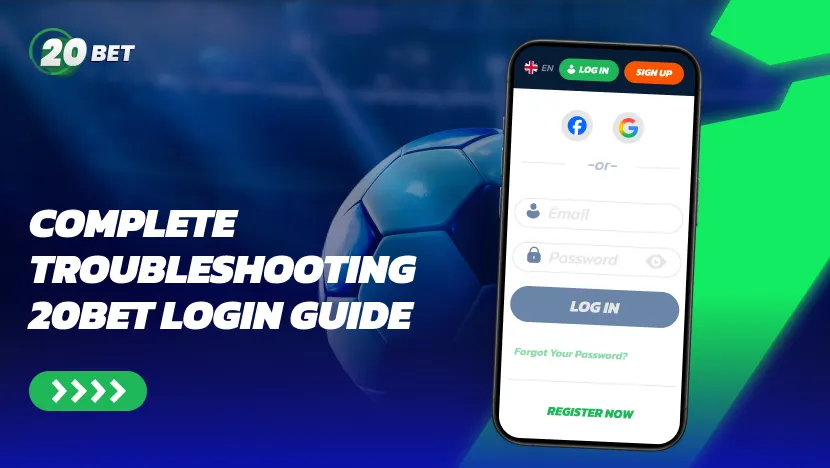
If the 20Bet site won’t let you in, it can feel like your bets and balance are stuck behind glass. This guide walks you through the most common problems during the 20Bet login process, how to fix them step by step, and how to keep your account secure on desktop and mobile.
Common 20Bet Login Problems
Most 20Bet casino login issues fall into a few clear categories:
| Problem | Likely cause | Quick fix |
| Incorrect details | Wrong username or password, typo, Caps Lock | Reset password, check keyboard layout and saved logins |
| Suspicious activity/2FA prompt | Expired token, frequent password changes, VPN use | Enter the security code sent to your email |
| Account locked or suspended | Too many failures, pending 20Bet verification | Wait for unlock or contact support |
| Browser/device errors | Old browser, broken session, cache, extensions | Clear cache/cookies, switch browser or device |
Incorrect Credentials Errors
The most common cause is simply incorrect login details. Check that your username and password are entered exactly as created, paying attention to upper- and lower-case letters.
If you see repeated errors or the system asks you to solve a CAPTCHA again and again, your current login session may have hit a security limit or timeout after several failed attempts.
You have exactly five attempts to enter your correct credentials. After five failed tries, you will have to reset your password.
Two-Factor Authentication Issues
If you’ve enabled extra authentication via SMS, email, or an app, the one-time token needs to be entered quickly. Codes can fail when
- The SMS or email arrives late.
- The time on your phone is not synced correctly.
- You accidentally reuse an old code.
Always request a fresh code and enter it on the current screen only. If you use an authentication app or biometrics (fingerprint/Face ID) with the 20Bet app login, check that the app is updated and unlocked before trying again.
If you regularly use a VPN, expect more frequent two-factor authentication failures — VPNs can alter the IP and session data that 20Bet’s authentication system checks against.
Account Locked or Suspended
Several failed attempts in a row can temporarily lock your 20Bet account. The same can happen if the security system flags unusual IP locations, strange gateway errors, or attempts from devices that sit outside the normal whitelist and are added to a risk blacklist.
If your account is locked, contact the support team at [email protected]. Provide them with the details of your account, such as your username, email, and the approximate time the lock occurred.
Browser & Device Problems
Sometimes the issue sits with your device instead of the server:
- Outdated browser that doesn’t fully support modern SSL encryption or the site’s protocol;
- Corrupted cookies causing broken sessions and login loops;
- Aggressive firewall or antivirus settings blocking scripts;
- Suspicious extensions or privacy-focused browsers such as Brave, which may block certain authentication scripts by default.
Trying another browser or device is a quick way to test this. If that resolves the issue, clean up the original device before using it again.
Step-by-Step Fixes for 20Bet Login Issues
Resetting Your Password
On the home page, open the login form and click “Forgot Your Password?” Then enter the email linked to your 20Bet account and confirm.
Check your inbox for the password reset email and click the Change Password button. This takes you to a secure page where you can set a new password.
Clearing Cache & Cookies for Login Success
If you keep looping back to the login screen or the interface looks broken, clear your cached data:
- Close all 20Bet tabs.
- In your browser history settings, clear recent cache and cookies for the site.
- Restart the browser and visit the site again.
- Log in from the fresh page rather than an old bookmark.
On mobile, reinstalling the app gives you a clean install and resets your connection to the server, which can resolve persistent login loops.
Updating Authentication Settings
For extra security on both the 20Bet mobile app and site, update your account credentials from time to time. Consider changing your password if you have logged in from another device or from a device you no longer have.
If 20Bet detects suspicious activity on your account, a security code will be sent to your registered email. You will need to enter this code alongside your password when logging in.
Contacting 20Bet Support
If none of the above fixes work, reach out to 20Bet casino customer service at [email protected]. Before you start, have the following ready:
- Your registered email address and approximate account creation date.
- A screenshot of any error message you received.
- Your device type, browser or app version, and country.
Preventing Future Login Problems
Keeping Your Account Secure
These cybersecurity habits reduce the risk of unauthorized access to your 20Bet account:
- Always access the site via the official URL with a padlock icon showing an active SSL connection.
- Avoid clicking login links in random emails or social media messages; they may host malware.
- Never share login details with anyone and avoid using the same password across multiple platforms.
Best Practices for Password Management
Use a unique password for 20Bet that you do not reuse elsewhere. For added security, type the password yourself rather than clicking “Save Password” when your browser prompts you to.
Using Supported Devices & Browsers
Stick to mainstream browsers such as Chrome and Firefox and recent versions of Android or iOS. Old software can disrupt secure protocols and cause login failures or timeouts.
Recognizing Security Flags
Watch out for:
- Emails urging you to confirm your 20Bet login via unknown links.
- Pages where the design or interface looks wrong, or the certificate name does not match.
- Messages — emails, texts, or ads — creating urgency around account suspension, bonus expiration, or security risks, and asking you to log in or provide details immediately.
These are phishing tactics. Navigate to 20Bet directly rather than clicking any link.
Related Account Access Topics
20Bet Withdrawal Access After Login Issues
If your account was locked for security reasons, withdrawals may pause until checks are complete. Once 20Bet completes all verification, you can log in and request payouts as usual.
Managing Bonuses & Promotions Around Login Problems
Missing a session due to login trouble does not change the rules for 20Bet casino bonus offers. Wagering deadlines and limits still apply, so contact support if a technical issue prevented you from using an active offer.
Deposits & Withdrawals When You Can’t Log In
If you are locked out, focus on resolving the login issue first using the steps in this guide. Once you regain access, check your transaction history to confirm no pending activity was affected during the lockout period. If you notice any unrecognized transactions, report them immediately to the support team.
VIP Login Considerations
High-value or VIP players may have additional checks on new devices and IP addresses. That protects larger balances and may include extra biometrics prompts or flagged logins from unusual regions.
If you are a VIP player and your login is unexpectedly blocked or flagged, contact support directly — VIP accounts receive priority handling, and the team can run an account audit to identify the cause.
FAQ
Why am I unable to log into my 20Bet account?
Most failures come from incorrect details, browser issues, or temporary locks after several failed attempts. Try a password reset and a different device before contacting support.
What should I do if I forgot my 20Bet password?
Click “Forgot Your Password?” on the login page and enter your registered email address. Follow the link in the reset email to set a new password. Then return to the 20Bet casino login screen and sign in again.
How can I fix 20Bet login errors on mobile?
Check that the app is updated, your connection is stable, and you enter the correct details. If the 20Bet app login mobile screen keeps failing, clear app data or reinstall the app, then try again over a trusted Wi-Fi network.
Will my withdrawal be delayed if I face login issues?
Yes, if you cannot access your account, you cannot confirm or track withdrawals. Fix the login problem first, then review your withdrawal status or contact support for updates.

Related Posts
See All-
 04/10/24
Gilberto Silva And Marc Gonzalez Roped In As 20Bet Ambassadors
There is some exciting news for the football fans in Brazil and Chile as 20Bet has signed former footballers Gilberto Silva and Marc Gonzalez as the LATAM Brand Ambassadors for their promotions and campaigns in the two countries.
-
 02/04/25
The Best Table Games to Try at 20Bet Casino
Explore 20Bet diverse table game selection. From classic blackjack to live dealer roulette, find your favorite and learn winning tips today.
-
 07/06/25
From Casual to Pro: How to Build Your 20Bet Casino Strategy?
Master 20Bet Casino! Learn how to build a winning strategy with expert tips on game selection, RTP, bankroll management, bonus codes, and optimizing your account for long-term success.
-
 09/06/25
Spin & Win: Best Online Slots at 20Bet
Discover the best online slots at 20Bet, featuring high RTP games like Blood Suckers (98%) & Book of 99 (99%), huge progressive jackpots, and popular titles from top casino providers. Enjoy classic slots, video slots, and Megaways slots on mobile!
Choose a language Done Subscription successful! Stay tuned for our exciting news and offers.
Error We’re sorry, something went wrong. Please try again later.