At the 20Bet online casino, most Canadian players gravitate toward Skrill or Neteller out of habit. MuchBetter is a newer alternative, but it’s worth a look. Choosing between these three popular options ultimately comes down to how much money you move and how frequently. All three land deposits in seconds and return your winnings faster than a card or bank transfer.
One important detail to understand upfront is that 20Bet is operated by Starsten Ltd., registered in the British Virgin Islands, and holds a Kahnawake Gaming Commission licence. The Kahnawake Gaming Commission is a Canadian Indigenous regulatory body based in Quebec, which gives 20Bet a different regulatory standing than many offshore operators — though it still operates outside provincial licensing frameworks.
The cashier shows Canadian dollars but processes transactions in euros, which means a currency conversion takes place every time you deposit or withdraw. That conversion can affect the overall cost of using these payment methods.
Overview of MuchBetter, Skrill, and Neteller
These three are closer to siblings than rivals. Each functions as a digital wallet that can be funded through a card, bank account, Interac, or crypto. Once funded, you can use the wallet to make deposits at 20Bet without sharing your banking or card information directly with the casino, adding an extra layer of security around your everyday finances.
Skrill launched in the UK in 2001 as Moneybookers and joined Paysafe in 2015. It reaches more than 200 countries and works as a payment gateway across retail and everyday finance, not just gambling.
Neteller, also owned by Paysafe, is very similar in structure and functionality. Built for smartphones and gambling, MuchBetter entered the market in 2017. Its standout features include a dynamic CVV — a security code that refreshes continuously — and a prepaid Mastercard linked to your balance. All three offer polished mobile applications that make managing funds straightforward.
How These E-Wallets Work for Online Casino Payments
The process is virtually identical for all three: registration, identity verification, adding funds, then selecting the wallet at the 20Bet cashier and confirming. Deposits are usually completed within seconds.
Withdrawals follow the same route in reverse — 20Bet sends your winnings to the wallet, and from there you spend the money, push it to your bank, or use a linked card.
Why Canadian Players Prefer E-Wallets for 20Bet
Speed is the biggest advantage. While 20Bet generally processes withdrawal requests within roughly 24 hours, wallet payouts clear well ahead of cards (three to five business days) and bank wires. A wallet also puts a layer between your finances and an offshore site, adds convenience, and doesn’t cost you the welcome bonus.
Using MuchBetter at 20Bet
20Bet is one of the casinos that accept MuchBetter for both deposits and withdrawals.
How to Deposit with MuchBetter
Download the MuchBetter app and complete the registration process with your name, date of birth, email address, phone number, and preferred funding method. In Canada, you can fund it with a card, Interac, or crypto.
Once your wallet is funded, navigate to the 20Bet Cashier, select Deposit, and choose MuchBetter as your payment method. Enter your amount (the minimum deposit is C$15) and confirm the transaction — the balance updates immediately.
Among the MuchBetter-friendly casinos available to Canadians, 20Bet adds no extra hoops.
Withdrawal Process and Timing
Go to the Cashier, select Withdrawal, choose MuchBetter, enter the amount you wish to cash out (C$15 minimum), and confirm.
20Bet generally processes withdrawals within 24 hours, although processing times may be longer if your account verification has not yet been completed.
Two rules apply to every method at 20Bet:
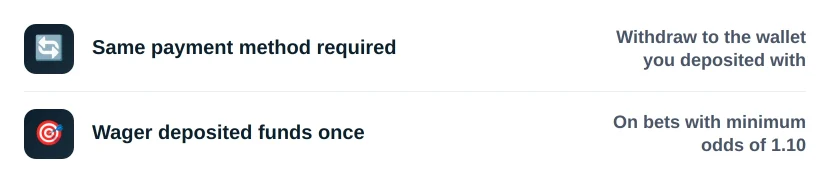
While some casinos that accept MuchBetter deposits bury this in the small print, 20Bet states it plainly in its terms.
Fees, Limits, and Currency Conversion
20Bet doesn’t charge fees for MuchBetter transactions and often refunds what the payment system adds.
Your real cost is the currency exchange, as Canadian dollars are converted to euros during the transaction process.
Withdrawal limits sit at roughly C$6,000 per day, C$15,000 per week and C$60,000 per month.
Pros and Limitations for Canadian Users
A casino with MuchBetter gives you a refreshing CVV for security, a strong mobile app, a prepaid Mastercard, and high limits. The main drawback is cost: funding a MuchBetter wallet is often more expensive than making a direct Interac deposit, so players treating 20Bet as their main option among the available MuchBetter casinos in Canada tend to reserve it for larger sessions.
Using Skrill at 20Bet
Skrill is the wallet most people start with. When you deposit at a casino using Skrill, the transaction clears immediately, and the fee structure is more predictable than most alternatives.
How to Deposit with Skrill
Create your Skrill account at Skrill.com and accept the terms. Fund the wallet from a card or bank, then navigate to the 20Bet Cashier, select Deposit, and choose Skrill as your payment method. Enter the amount you wish to deposit and confirm the transaction.
Making a Skrill deposit at an online casino like 20Bet clears immediately once the wallet is funded. The full process takes under two minutes from the cashier to the confirmed balance. The minimum Skrill casino deposit at 20Bet is C$15.
Withdrawal Options and Processing Times
To withdraw funds, go to the Cashier, select Withdrawal, choose Skrill, and confirm the request.
20Bet generally processes withdrawals within approximately 24 hours. Once approved, Skrill usually delivers the funds on the same day.
The same-method rule applies: if you deposit with Skrill, withdraw to Skrill. Switching to a bank transfer after a wallet deposit gives 20Bet grounds to decline it. If a withdrawal is delayed, 20Bet customer support can provide details regarding any outstanding verification requirements or processing issues.
Fees, FX Charges, and Restrictions
20Bet does not charge fees for Skrill transactions. However, Skrill itself applies a 3.99% currency conversion fee. Since 20Bet processes transactions in euros, Canadian players should expect currency conversion fees when depositing or withdrawing. Funding Skrill with a credit card may also incur additional charges, typically around 1%. The VIP program lowers that fee structure for heavy users and raises transfer limits.
Note that 20Bet doesn’t permit third-party payments, so the Skrill account must be registered in your own name, or your winnings are at risk.
Skrill Availability in Canada and Common Issues
Skrill is fully available in Canada, and Canadian players can use it without restrictions on the wallet side. When it comes to Canadian online casinos that accept Skrill, the options range from provincially licensed platforms to offshore operators.
For Canadian players searching for a reliable Skrill casino, 20Bet handles the full round trip — deposits and withdrawals both. The common issues are straightforward: an unverified account hitting transfer limits faster than expected, and a currency mismatch between your Skrill account currency and the euro-denominated cashier adding a conversion charge. Both are solved by completing verification early and setting your Skrill account currency before your first deposit.
Using Neteller at 20Bet
Neteller operates almost identically to Skrill, and the range of Neteller casinos available to Canadian players has grown steadily over the past few years.
How to Deposit with Neteller
Complete your Neteller registration, finish verification, and fund it from a card, bank, or crypto. At 20Bet, go to the Cashier and select Deposit and then Neteller. Enter the amount you wish to deposit (C$15 minimum) and confirm — funds arrive in seconds. That immediacy is what players expect when choosing Neteller at an online casino in Canada.
How Withdrawals Work
To withdraw funds, go to the Cashier, select Withdrawal, choose Neteller, enter your withdrawal amount, and confirm the request. Once 20Bet approves (usually within a day), the money is delivered quickly, often the same day. The same-payment-method and wagering requirements apply here as well.
Fees, Limits and Supported Currencies
Neteller’s fee structure closely mirrors Skrill’s. 20Bet does not charge fees for Neteller deposits or withdrawals. However, Neteller applies a 4.49% currency conversion fee when funds are exchanged between Canadian dollars and euros. VIP tiers unlock lower fees, higher caps, and multi-currency accounts. The withdrawal limits set by 20Bet are consistent with those at most online casinos that accept Neteller, so plan your session size around those ceilings.
MuchBetter vs Skrill vs Neteller
Side by side, the differences in speeds, fees, and convenience become easier to evaluate. This comparison covers the points that actually affect a 20Bet session.
| Factor | MuchBetter | Skrill | Neteller |
| Deposit speed | Instant | Instant | Instant |
| Withdrawal (after ~24h review) | Fast, depending on verification status | Often same day | Often same day |
| 20Bet fees | None, often reimbursed | None | None |
| Wallet funding cost | Varies; roughly 1% by card | Around 1%; some methods are free | About 1%-2.99% |
| Currency conversion (CAD to EUR) | Wallet’s own exchange margin | 3.99% | 4.49% |
| Inactivity fee | Varies | ~$5/month after 12 months | ~$5/month; applies after 6 months |
| Ease of use/mobile | Built for smartphones; dynamic CVV; prepaid Mastercard | Most mature app; stored details; 1-Tap | Same level; includes crypto trading |
| Availability in Canada | Accepted; growing in gambling markets | Accepted; broad offshore coverage | Accepted; broad offshore coverage |
Which E-Wallet Is Best for 20Bet Players?
With availability off the table, the evaluation comes down to cost and play style.
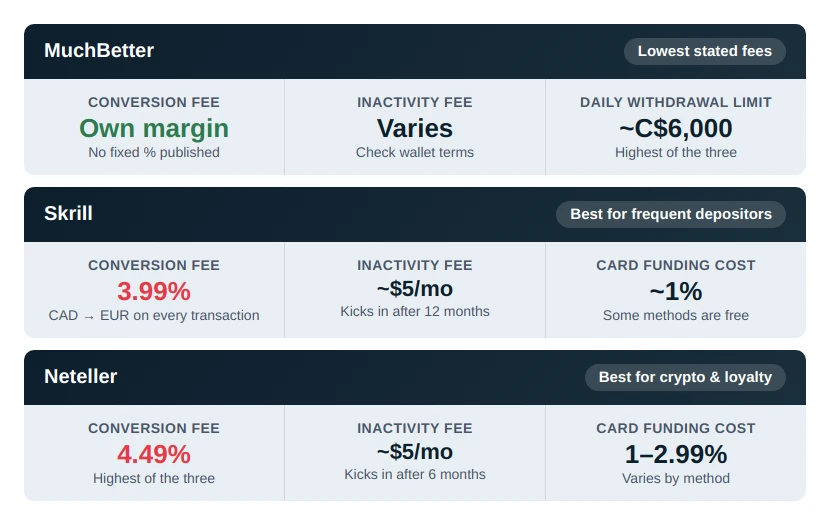
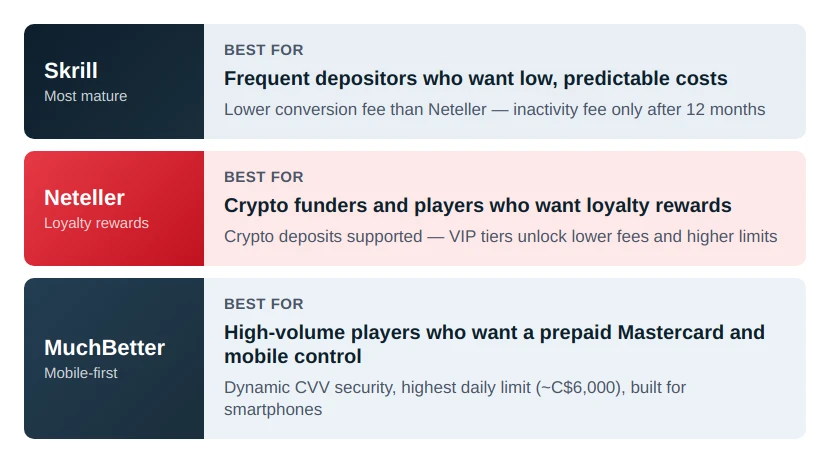
Frequent depositors who want low costs do best with Skrill. Neteller suits you if you fund with crypto or want loyalty rewards. MuchBetter earns its place for high-volume players who want the prepaid Mastercard and higher daily limits managed entirely from a mobile app.
How to Set Up Each E-Wallet
Whichever you settle on, the setup process follows a similar path.
Account Registration Process
Open the app or site, complete registration, choose your account currency, and accept the terms. Set the account currency to CAD whenever possible — it simplifies your side of the exchange.
Linking Your Bank or Card
Connect a funding source: Visa or Mastercard, a bank account, Interac or (for MuchBetter and Neteller) crypto. That source fills the wallet and stays invisible to 20Bet. Turn on two-factor authentication first; it guards against the most common intrusions and adds a layer of security.
Verification Requirements (KYC)
Both the wallet and 20Bet require identity verification, so prepare your documents before you request a withdrawal. You’ll need a clear photo of a valid ID (passport, national ID, or driver’s licence) matching your account exactly, along with a photo or screenshot of your payment system with matching details. Scanned copies are rejected.
Add proof of address dated within the last three months. In some cases, 20Bet may also request a selfie showing you holding your ID. These requirements are part of the regulatory compliance procedures that both the casino and payment providers must follow.
Verification is often triggered once certain deposit or withdrawal thresholds are reached. Players should also be aware that verification deadlines can be strict. Failure to complete the process within the required timeframe may result in account restrictions or closure.
Common Setup Problems and Fixes
The most common issue is a mismatch between the name on your wallet, your 20Bet account, and your ID. Third-party payments are rejected, so every detail has to match.
Low transaction limits are another common concern. In most cases, this simply means the verification process has not been fully completed. Once verification is approved, higher limits typically become available.
If you’re unsure why a transaction is delayed or restricted, 20Bet customer support can usually confirm what documents or steps are still required.
Finally, remember that 20Bet converts CAD to euros on every transaction regardless of your wallet currency. Be sure to account for exchange-rate costs when deciding how much money to transfer.
Advantages and Disadvantages of E-Wallets
Once you’re set up and verified, the wallet is ready. The advantages are clear, but the drawbacks deserve equal weight, so here’s an honest evaluation of both.
Benefits of Using MuchBetter, Skrill, and Neteller
The biggest advantage is speed. All three e-wallets support instant deposits and provide some of the fastest withdrawal routes available at 20Bet.
Other key benefits include:
- Eligibility for the full 20Bet welcome bonus, with no exclusions for e-wallet users.
- Added privacy, since your banking details are never shared directly with the casino.
- Strong security features across all three platforms.
- Additional protection through MuchBetter’s dynamic CVV technology and enhanced authentication tools.
Risks and Limitations to Consider
While 20Bet generally does not charge fees for e-wallet transactions, costs can still accumulate on the payment-provider side.
The main expenses to watch for are:
- Currency conversion fees charged by Skrill (3.99%) and Neteller (4.49%).
- Additional CAD-to-EUR exchange costs, since 20Bet processes transactions in euros.
Verification can also be more demanding because it involves both the e-wallet provider and the casino. In many cases, players must complete identity checks for two separate services within a limited timeframe.
Other limitations include:
- Withdrawals are typically restricted to the same payment method used for deposits.
- The wagering requirement means deposited funds must be played through before they become eligible for withdrawal.
- E-wallet accounts that remain inactive may be subject to inactivity fees.
When You Should Avoid E-Wallets
For a small, one-off deposit, Interac skips the conversion step and usually costs less. If verification with two separate services feels like too much, a card or Interac is cleaner. And if you plan to withdraw to a bank account, decide before you deposit — 20Bet may hold you to the method you funded with.
Responsible Gambling
Betting should be entertainment, not a way to make money. Gambling can be addictive—only bet what you can afford to lose, and never chase your losses. Set deposit, loss, and time limits before you play, and take regular breaks.
If gambling stops being fun or starts affecting your finances, relationships, or wellbeing, seek help immediately.
Support available across Canada:
- Responsible Gambling Council: responsiblegambling.org (national resource center)
- British Columbia: Call 1-888-795-6111 (24/7)
- Alberta: Call 1-866-332-2322 (24/7)
- Quebec: Call 1-800-461-0140 (24/7, bilingual)
- Saskatchewan: Call 1-800-306-6789 (24/7)
- Manitoba: Call 1-800-463-1554 (24/7)
- Atlantic provinces: Call 1-800-461-1234 (NB), 1-888-429-8167 (NS), 1-855-255-4255 (PE), 1-888-899-4357 (NL)
- Additional support: Gambling Therapy (gamblingtherapy.org), Gamblers Anonymous (gamblersanonymous.org)
- 988 Suicide Crisis Helpline: Call or text 988
20Bet provides responsible gambling tools in your account settings, including deposit limits, loss limits, time limits, cool-off periods, and self-exclusion. Use them.
Age restrictions: You must be 19 or older to gamble in British Columbia, Saskatchewan, and Atlantic provinces. You must be 18 or older in Alberta, Manitoba, and Quebec. Underage gambling is illegal.
20Bet is licensed and regulated by the Kahnawake Gaming Commission. For more information about responsible gambling practices and support resources, visit the Responsible Gambling section on 20Bet.

FAQ
Is MuchBetter faster than Skrill and Neteller at 20Bet?
Not meaningfully. All three options offer instant deposits and fast withdrawals once 20Bet completes its review process. The 20Bet withdrawal time, typically within a day, sets the pace — not the wallet you chose. The processing speeds are effectively the same.
Are Skrill and Neteller withdrawals available in Canada?
Yes. Both handle deposits and withdrawals for Canadian players at 20Bet; just deposit with the wallet you intend to cash out to. Unlike some casinos with Neteller support that drop the welcome bonus for wallet deposits, 20Bet leaves it available.
Do these e-wallets charge fees for casino transactions?
20Bet doesn’t, and it often refunds payment-system charges. The costs come from the wallets: 3.99% on currency conversion for Skrill and Neteller, plus the CAD-to-euro swap.
Which payment method is safest for 20Bet players in Canada?
All three sit under recognised regulation and reputable ownership: Skrill and Neteller under Paysafe, MuchBetter with its rotating CVV authentication. The safest choice is whichever you fully verify and register in your own name.


Related Posts
See All-
 11/03/26
20Bet Withdrawal Options Explained: Fastest & Safest Payout Methods
Step-by-step guide to 20Bet payouts. Find out why your withdrawal is pending, how to pass KYC verification, and the minimum/maximum withdrawal limits for 2026.
-
 16/03/26
20Bet Casino New Releases: Best Games to Try Right Now
Read about the latest 20Bet casino games, including high-RTP slots like Dr. Luck (98.5%) and new live dealer tables. Discover trending titles and expert gameplay tips.
-
 19/03/26
20Bet VIP Login Guide: Get More From Your Loyalty & VIP Rewards
Stop missing out on 20Bet loyalty points. See how to unlock 30 VIP levels automatically, get 5x wagering on sports bonuses, and reach the $100k grand prize.
-
 15/06/26
How to Fund Your 20Bet Account When RBC, TD, or Scotiabank Blocks Your Card
Is your RBC, TD, or Scotiabank card blocked on 20Bet? Learn why Canadian banks decline offshore casino deposits and find safer, guaranteed alternative funding methods.
Choose a language Done Subscription successful! Stay tuned for our exciting news and offers.
Error We’re sorry, something went wrong. Please try again later.